
Get Started

In-House vs Outsourced SaaS Customer Support: How to Decide

In-house vs outsourced SaaS customer support: hourly cost comparison and decision guide

By Oscar Lausen, Co-Founder & COO of AssistRing. Last updated: September 2, 2026.

Outsource SaaS customer support once ticket volume outgrows what two or three in-house reps can carry, once support needs to run past your own working hours, or once hiring and training agents costs more than the tickets they close. Below are the actual numbers: what outsourcing costs against a fully loaded in-house hire, and where each model tends to break down.

When should a SaaS company outsource customer support?

The tipping point rarely arrives as one dramatic event. It shows up as three ordinary signals appearing in the same month: your first-response time starts missing the SLA you promised customers, at least one channel (chat, email, or the phone line) sits unstaffed outside a narrow window, and an engineer keeps getting pulled off product work to answer a billing question. Any one of those is a bad week. All three together mean your support function has outgrown its headcount.

Outsourced customer support means handing frontline ticket handling, whether by phone, chat, or email, to a partner team that operates inside your own ticketing system, under your SLAs, your knowledge base, and your escalation rules, while your company keeps ownership of the product and the customer relationship. That last part is what separates it from simply routing tickets to a stranger: the partner works your playbook, not their own.

Waiting too long to make that call has a cost, and it doesn’t show up on the support budget line. Zendesk’s benchmark research found that 73 percent of consumers will switch to a competitor after multiple bad experiences, and more than half will leave after just one. A SaaS product with strong retention numbers can still bleed accounts quietly through a support queue nobody is watching closely enough.

How much does outsourced SaaS customer support cost compared to in-house?

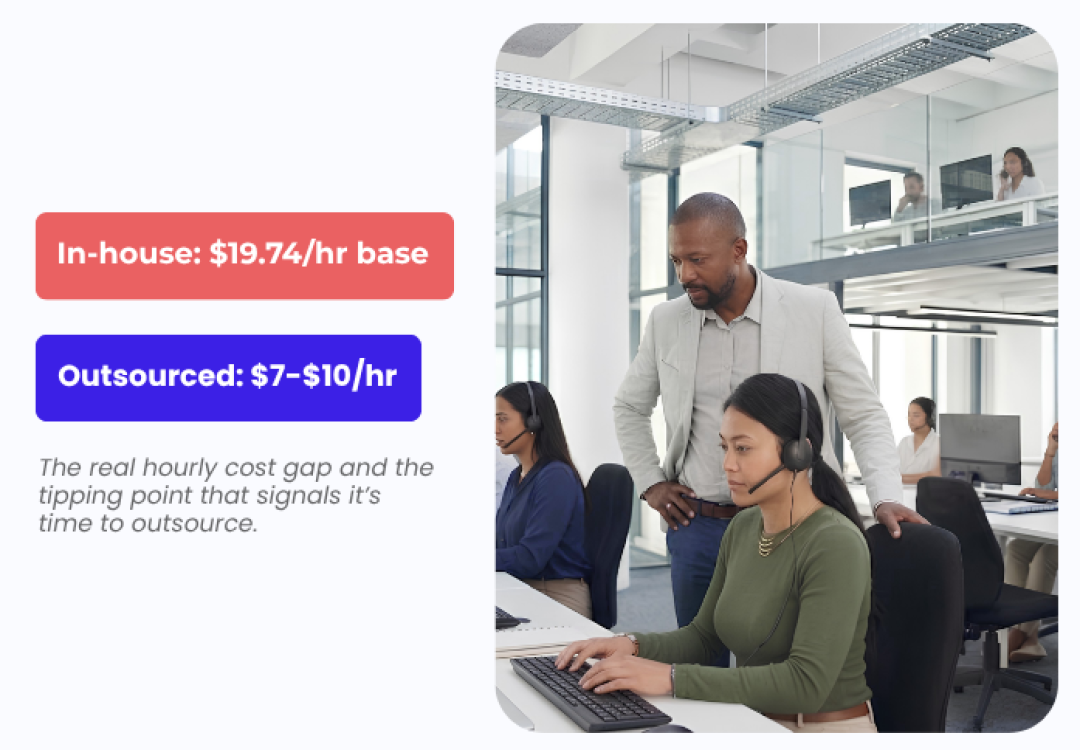
Outsourced support usually costs less per hour than a fully loaded in-house hire, but the size of the gap depends entirely on where the outsourced team sits. According to Crescendo.ai’s 2026 pricing research, the average base salary for a US-based in-house support rep runs $18.80 to roughly $19.74 per hour, and that figure is a base wage only. It excludes benefits, management overhead, software seats, and the office space the person sits in.

Support modelHourly rate (2026)What’s included
In-house (US), base wage only$18.80–$19.74Wages before benefits, management time, software, infrastructure
Outsourced, US-based$29.40–$42.00Seat, technology, supervision and management included
Outsourced, Latin America$12.00–$19.00Seat, technology, supervision and management included
Outsourced, Asia (India, Philippines, Pakistan)$7.00–$16.00Seat, technology, supervision and management included

Source: Crescendo.ai, Outsourced Call Center Pricing Guide, 2026.

The headline in-house number looks cheaper than it is. It’s a wage before the costs that never show up in a job posting: benefits, a manager’s time, software licenses, and shrinkage, the share of paid hours lost to breaks, training, and system downtime that every staffed team carries whether anyone tracks it or not. Once those are added in, Crescendo.ai puts offshore outsourcing in Asia at roughly 75 to 80 percent cheaper than a fully loaded US in-house hire. That’s the number that actually belongs in a build-versus-buy spreadsheet, not the base wage alone.

What do you give up when you outsource SaaS support?

The real risk in outsourcing isn’t the invoice. It’s a drop in first contact resolution, the share of tickets closed without a follow-up message, that shows up weeks later as repeat contacts and, eventually, churn. A partner team that doesn’t know your product well enough gets tickets closed on the surface and reopened by a frustrated customer three days later.

That’s also where AI-only support falls short as a substitute. Gartner’s 2026 Customer Insights study, which surveyed 3,566 B2B and B2C customers, found that 87 percent of customers say companies using generative AI in customer service must still preserve access to a human agent. Outsourcing solves the staffing problem a chatbot can’t: it adds trained people, not just automated deflection.

This is why AssistRing runs on a human-in-the-loop model rather than a pure offshore-and-forget arrangement: dedicated agents work your SOPs on-site, and AI tooling supports them rather than replacing them. You can read the full framework on the HITL page. The mechanism that keeps quality from slipping is unglamorous: SLAs written into the contract, a real onboarding period before the team touches live tickets, and a documented escalation path so a partner agent knows exactly when to hand a ticket back rather than guess.

Can AI reduce how many support agents a SaaS company needs?

AI lowers ticket volume, it doesn’t eliminate the need for people. Deflection rate measures the share of incoming tickets a bot or self-service tool resolves without ever reaching a human agent. A high deflection rate is only good news if the tickets that do reach a person get handled well, not stacked into a queue nobody is watching. Password resets and order status questions deflect cleanly. A billing dispute or an angry churn-risk customer usually doesn’t.

Handoff context is the detail most companies get wrong when they add AI in front of a support queue: it’s the conversation history, account state, and prior troubleshooting steps that get passed to a human agent when the bot can’t finish the job. Weak handoff design is the reason customers end up repeating themselves to a live agent right after explaining the problem to a chatbot, which erases whatever goodwill the automation was supposed to build.

“The tools change how fast a team ramps up, not whether you need people on the floor,” says Muhammad Usama, AssistRing’s HOD of Vendor and Marketing, who oversees recruitment pipelines and campaign KPIs. “What actually matters is whether the agent has full context the moment a conversation gets handed to them. That’s where most AI-plus-human setups fall apart, not in the AI itself.”

AssistRing’s own AI layer, ARIS, is built around that principle: tools like Agent Co-Pilot give live, on-screen guidance to agents mid-call so they stay aligned with scripts and SOPs, rather than replacing the agent handling the conversation.

How do you evaluate an outsourced SaaS support partner?

A structured evaluation catches the gaps a sales deck won’t mention. Work through these in order before signing anything:

  1. Map your own ticket volume and channel mix first. You can’t price or staff a partnership without knowing how many tickets you get by channel and by hour of day.
  2. Ask for real first-contact-resolution and average-handle-time numbers from a comparable account, not the marketing deck’s best-case figures.
  3. Check off-hours and weekend coverage specifically. A partner that only staffs 9-to-5 US time solves half your problem at best.
  4. Confirm how your SOPs and escalation rules actually get loaded into their systems, and who updates them when your product changes.
  5. Ask what happens when an agent can’t resolve a ticket. A vague answer here usually means weak handoff design downstream.
  6. Verify how they handle anything touching payment data, health information, or EU customer data, and confirm their practices are aligned with PCI-DSS, HIPAA, and GDPR standards for the regions you operate in.
  7. Start with a bounded pilot, one product line or one channel, before moving your full queue over.

AssistRing published a longer buyer’s guide to sourcing a BPO vendor that walks through this in more detail, including the questions worth asking in the first sales call rather than after signing.

Where the Hamburg-Karachi model fits

Most of AssistRing’s SaaS clients sell into the US, UK, and EU markets, including Germany and Spain, where response-time expectations and data-handling questions differ by region. Strategy and campaign design happen in Hamburg; delivery runs from an on-site team in Karachi rather than a distributed work-from-home pool, which is part of how the pricing in the table above stays close to the offshore end without losing the SLA discipline of an in-house team. If your SaaS support needs multilingual coverage for European markets specifically, that’s a separate conversation from staffing headcount, and worth having before you sign a contract, not after.

Frequently asked questions

How much does outsourced SaaS customer support cost compared to an in-house team?

Offshore outsourced support in Asia typically runs $7 to $16 per agent hour versus a fully loaded US in-house hire, a gap Crescendo.ai puts at roughly 75 to 80 percent once benefits, management, and software are counted. A domestic outsourced US team runs $29.40 to $42 per hour, still often below a fully loaded in-house cost.

At what point should a SaaS company outsource customer support?

Watch for three signals together: response times slipping past your stated SLA, at least one support channel going unstaffed outside business hours, and engineers getting pulled off product work to answer tier-1 tickets. Any one alone is manageable. All three at once usually means it’s time to bring in outside capacity.

Will customers know if my support team is outsourced?

Not if the team is trained on your product, your tone, and your escalation rules, and works inside your own ticketing system under your SLAs. Customers notice slow replies and wrong answers, not which company issues the agent’s paycheck. Quality gaps come from weak onboarding, not from outsourcing itself.

Can outsourced agents handle technical SaaS product questions?

Yes, with proper ramp-up. Outsourced teams handle tier-1 and tier-2 tickets, billing, account setup, and common how-to questions once trained on your product, with a documented escalation path to your engineers for anything past that. Deep technical debugging usually stays in-house or moves to a specialized technical tier.

What’s the difference between outsourcing support and using an AI chatbot?

A chatbot deflects simple, repetitive questions before they reach a person. Outsourcing adds trained humans who handle everything a bot can’t, including judgment calls and frustrated customers. Gartner’s 2026 research found 87 percent of customers want a human option preserved even when AI handles the first response.

Want a straight read on where your break-even point sits? Talk to AssistRing about your ticket volume and we’ll run the numbers with you before you commit to either model.

By Oscar Lausen, Co-Founder & COO of AssistRing. Last updated: September 2, 2026.

Outsource SaaS customer support once ticket volume outgrows what two or three in-house reps can carry, once support needs to run past your own working hours, or once hiring and training agents costs more than the tickets they close. Below are the actual numbers: what outsourcing costs against a fully loaded in-house hire, and where each model tends to break down.

When should a SaaS company outsource customer support?

The tipping point rarely arrives as one dramatic event. It shows up as three ordinary signals appearing in the same month: your first-response time starts missing the SLA you promised customers, at least one channel (chat, email, or the phone line) sits unstaffed outside a narrow window, and an engineer keeps getting pulled off product work to answer a billing question. Any one of those is a bad week. All three together mean your support function has outgrown its headcount.

Outsourced customer support means handing frontline ticket handling, whether by phone, chat, or email, to a partner team that operates inside your own ticketing system, under your SLAs, your knowledge base, and your escalation rules, while your company keeps ownership of the product and the customer relationship. That last part is what separates it from simply routing tickets to a stranger: the partner works your playbook, not their own.

Waiting too long to make that call has a cost, and it doesn’t show up on the support budget line. Zendesk’s benchmark research found that 73 percent of consumers will switch to a competitor after multiple bad experiences, and more than half will leave after just one. A SaaS product with strong retention numbers can still bleed accounts quietly through a support queue nobody is watching closely enough.

How much does outsourced SaaS customer support cost compared to in-house?

Outsourced support usually costs less per hour than a fully loaded in-house hire, but the size of the gap depends entirely on where the outsourced team sits. According to Crescendo.ai’s 2026 pricing research, the average base salary for a US-based in-house support rep runs $18.80 to roughly $19.74 per hour, and that figure is a base wage only. It excludes benefits, management overhead, software seats, and the office space the person sits in.

Support modelHourly rate (2026)What’s included
In-house (US), base wage only$18.80–$19.74Wages before benefits, management time, software, infrastructure
Outsourced, US-based$29.40–$42.00Seat, technology, supervision and management included
Outsourced, Latin America$12.00–$19.00Seat, technology, supervision and management included
Outsourced, Asia (India, Philippines, Pakistan)$7.00–$16.00Seat, technology, supervision and management included

Source: Crescendo.ai, Outsourced Call Center Pricing Guide, 2026.

The headline in-house number looks cheaper than it is. It’s a wage before the costs that never show up in a job posting: benefits, a manager’s time, software licenses, and shrinkage, the share of paid hours lost to breaks, training, and system downtime that every staffed team carries whether anyone tracks it or not. Once those are added in, Crescendo.ai puts offshore outsourcing in Asia at roughly 75 to 80 percent cheaper than a fully loaded US in-house hire. That’s the number that actually belongs in a build-versus-buy spreadsheet, not the base wage alone.

What do you give up when you outsource SaaS support?

The real risk in outsourcing isn’t the invoice. It’s a drop in first contact resolution, the share of tickets closed without a follow-up message, that shows up weeks later as repeat contacts and, eventually, churn. A partner team that doesn’t know your product well enough gets tickets closed on the surface and reopened by a frustrated customer three days later.

That’s also where AI-only support falls short as a substitute. Gartner’s 2026 Customer Insights study, which surveyed 3,566 B2B and B2C customers, found that 87 percent of customers say companies using generative AI in customer service must still preserve access to a human agent. Outsourcing solves the staffing problem a chatbot can’t: it adds trained people, not just automated deflection.

This is why AssistRing runs on a human-in-the-loop model rather than a pure offshore-and-forget arrangement: dedicated agents work your SOPs on-site, and AI tooling supports them rather than replacing them. You can read the full framework on the HITL page. The mechanism that keeps quality from slipping is unglamorous: SLAs written into the contract, a real onboarding period before the team touches live tickets, and a documented escalation path so a partner agent knows exactly when to hand a ticket back rather than guess.

Can AI reduce how many support agents a SaaS company needs?

AI lowers ticket volume, it doesn’t eliminate the need for people. Deflection rate measures the share of incoming tickets a bot or self-service tool resolves without ever reaching a human agent. A high deflection rate is only good news if the tickets that do reach a person get handled well, not stacked into a queue nobody is watching. Password resets and order status questions deflect cleanly. A billing dispute or an angry churn-risk customer usually doesn’t.

Handoff context is the detail most companies get wrong when they add AI in front of a support queue: it’s the conversation history, account state, and prior troubleshooting steps that get passed to a human agent when the bot can’t finish the job. Weak handoff design is the reason customers end up repeating themselves to a live agent right after explaining the problem to a chatbot, which erases whatever goodwill the automation was supposed to build.

“The tools change how fast a team ramps up, not whether you need people on the floor,” says Muhammad Usama, AssistRing’s HOD of Vendor and Marketing, who oversees recruitment pipelines and campaign KPIs. “What actually matters is whether the agent has full context the moment a conversation gets handed to them. That’s where most AI-plus-human setups fall apart, not in the AI itself.”

AssistRing’s own AI layer, ARIS, is built around that principle: tools like Agent Co-Pilot give live, on-screen guidance to agents mid-call so they stay aligned with scripts and SOPs, rather than replacing the agent handling the conversation.

How do you evaluate an outsourced SaaS support partner?

A structured evaluation catches the gaps a sales deck won’t mention. Work through these in order before signing anything:

  1. Map your own ticket volume and channel mix first. You can’t price or staff a partnership without knowing how many tickets you get by channel and by hour of day.
  2. Ask for real first-contact-resolution and average-handle-time numbers from a comparable account, not the marketing deck’s best-case figures.
  3. Check off-hours and weekend coverage specifically. A partner that only staffs 9-to-5 US time solves half your problem at best.
  4. Confirm how your SOPs and escalation rules actually get loaded into their systems, and who updates them when your product changes.
  5. Ask what happens when an agent can’t resolve a ticket. A vague answer here usually means weak handoff design downstream.
  6. Verify how they handle anything touching payment data, health information, or EU customer data, and confirm their practices are aligned with PCI-DSS, HIPAA, and GDPR standards for the regions you operate in.
  7. Start with a bounded pilot, one product line or one channel, before moving your full queue over.

AssistRing published a longer buyer’s guide to sourcing a BPO vendor that walks through this in more detail, including the questions worth asking in the first sales call rather than after signing.

Where the Hamburg-Karachi model fits

Most of AssistRing’s SaaS clients sell into the US, UK, and EU markets, including Germany and Spain, where response-time expectations and data-handling questions differ by region. Strategy and campaign design happen in Hamburg; delivery runs from an on-site team in Karachi rather than a distributed work-from-home pool, which is part of how the pricing in the table above stays close to the offshore end without losing the SLA discipline of an in-house team. If your SaaS support needs multilingual coverage for European markets specifically, that’s a separate conversation from staffing headcount, and worth having before you sign a contract, not after.

Frequently asked questions

How much does outsourced SaaS customer support cost compared to an in-house team?

Offshore outsourced support in Asia typically runs $7 to $16 per agent hour versus a fully loaded US in-house hire, a gap Crescendo.ai puts at roughly 75 to 80 percent once benefits, management, and software are counted. A domestic outsourced US team runs $29.40 to $42 per hour, still often below a fully loaded in-house cost.

At what point should a SaaS company outsource customer support?

Watch for three signals together: response times slipping past your stated SLA, at least one support channel going unstaffed outside business hours, and engineers getting pulled off product work to answer tier-1 tickets. Any one alone is manageable. All three at once usually means it’s time to bring in outside capacity.

Will customers know if my support team is outsourced?

Not if the team is trained on your product, your tone, and your escalation rules, and works inside your own ticketing system under your SLAs. Customers notice slow replies and wrong answers, not which company issues the agent’s paycheck. Quality gaps come from weak onboarding, not from outsourcing itself.

Can outsourced agents handle technical SaaS product questions?

Yes, with proper ramp-up. Outsourced teams handle tier-1 and tier-2 tickets, billing, account setup, and common how-to questions once trained on your product, with a documented escalation path to your engineers for anything past that. Deep technical debugging usually stays in-house or moves to a specialized technical tier.

What’s the difference between outsourcing support and using an AI chatbot?

A chatbot deflects simple, repetitive questions before they reach a person. Outsourcing adds trained humans who handle everything a bot can’t, including judgment calls and frustrated customers. Gartner’s 2026 research found 87 percent of customers want a human option preserved even when AI handles the first response.

Want a straight read on where your break-even point sits? Talk to AssistRing about your ticket volume and we’ll run the numbers with you before you commit to either model.